WCAG 2.2 AA Accessibility Checklist

Live Site
Live Site:
Overview
The WCAG 2.2 AA Accessibility Resource is an interactive checklist covering all 56 success criteria required for WCAG 2.2 AA compliance. The criteria are grouped by the four POUR principles: Perceivable, Operable, Understandable, and Robust.
For each criterion, the tool shows what to test, how to test it, and which tools to use. You work through the criteria, set a status for each one, Pass, Warning, Fail, or Not Applicable, and the tool tracks your progress live.
At the end of an audit, two exports are available. A CSV report of all 56 tested criteria and a Jira backlog TXT file with pre-filled ticket text for every Warning or Fail item. You take those files directly into sprint planning.
The tool also ships a downloadable Excel workbook with four worksheets: the full checklist, a testing tools reference, a defect log with severity tracking, and an audit summary dashboard.
Who is this for
The tool is built mainly for two types of people who approach accessibility from different angles but need the same clear, actionable output. It may also be used by a Product Owner or a Product designer to specify accessibility requirements.
Auditor/Tester: You evaluate a product against a compliance standard. You need a structured process, a defensible record, and output you can hand to a stakeholder or a legal team.

Developer/UI Engineer: You write or review the code. You want to know what to fix, where to find it, and how to verify the fix is complete.

Why I built this
I work across product and design. Accessibility audits are part of my work, but the resources available did not fit how product teams operate. Some were too technical without enough context. Others required specialist knowledge to interpret. None produced output ready for a development backlog.
I needed a tool mapping directly to WCAG 2.2 AA, not an older version, explaining the “why” and “how” for each criterion in plain language, and producing something a developer or product manager bring straight to a planning session.
I also needed the legal context in one place. Accessibility is a legal requirement in most jurisdictions, and non-compliance carries real risk. This resource covers the legislation teams need to know.

How I use this personally
I open the checklist at the start of every accessibility audit. My process is consistent across engagements.
- Open the checklist for the product being audited. Set the audit date.
- Filter by POUR principle to work through sections without losing context.
- For each criterion, run the specified tests using automated tools and manual checks.
- Set the status: Pass, Warning, Fail, or Not Applicable.
- Download the Jira backlog TXT. Bring the file into sprint planning.
- Download the CSV report for the audit record and stakeholder review.
- Re-test Warning and Fail items after fixes are deployed. Update statuses.
The Excel workbook sits alongside the web tool for offline work and stakeholder sharing. The defect log tab tracks severity and lets me produce a summary for delivery teams or clients.

Features
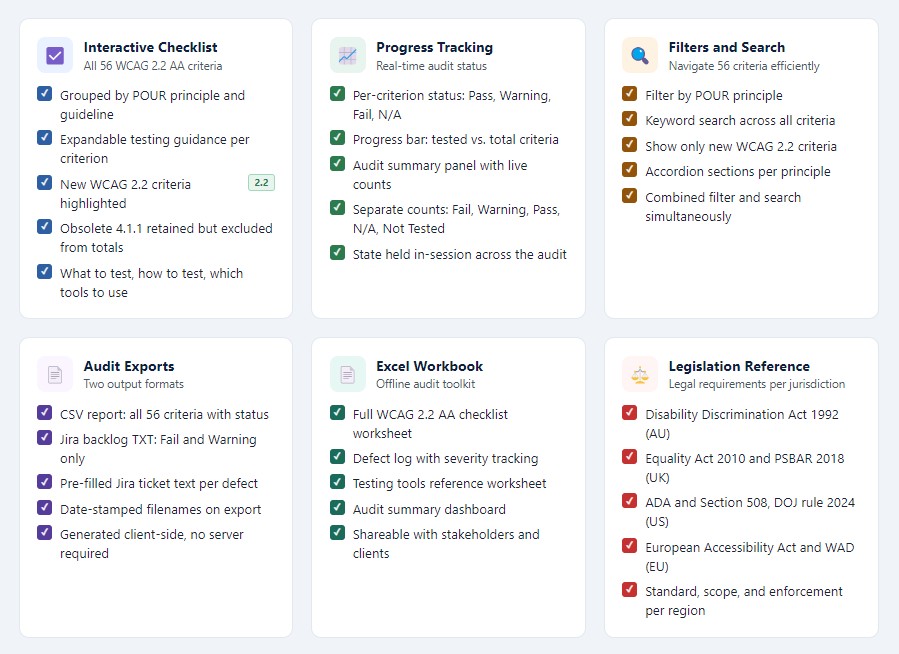
The tool covers all 56 WCAG 2.2 AA success criteria. Seven criteria new in WCAG 2.2 are highlighted, including Focus Not Obscured (2.4.11), Dragging Movements (2.5.7), Target Size Minimum (2.5.8), and Accessible Authentication (3.3.8). The obsolete 4.1.1 Parsing criterion is retained but excluded from audit totals.
- Filter by WCAG principle (Perceivable, Operable, Understandable, Robust)
- Keyword search across all criteria
- Filter to show only the seven criteria new in WCAG 2.2
- Per-criterion status: Not Tested, Pass, Warning, Fail, Not Applicable
- Progress bar tracking tested criteria against total
- Expandable testing guidance for each success criterion
- Audit summary panel: tested, pass, warning, fail, not-applicable counts
- Export: CSV report of all criteria with current status
- Export: Jira backlog TXT with pre-filled ticket text for Fail and Warning items
- Legislation reference for AU, UK, US, and EU
- Testing tools reference: 18 tools across browser extensions, screen readers, CLI, and manual methods
- Downloadable Excel workbook: checklist, defect log, tools reference, summary dashboard
- No build step required. Open index.html in any browser.
Automated tools detect around 30 to 40 percent of WCAG failures. The checklist is designed to be used alongside screen reader testing and keyboard-only navigation, not instead of them.
Testing with an AI agent
If I have access to the codebase being audited, I usually extend the process further. I point an AI agent at the source code and give it the WCAG 2.2 AA criteria as the evaluation framework. The agent reviews the code against specific success criteria and returns a structured report.
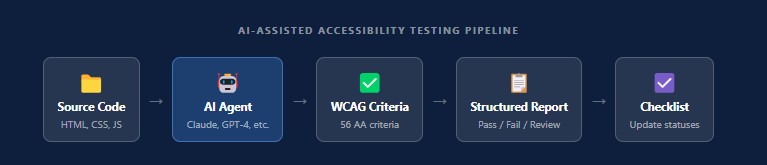
Do note that an AI agent does not replace manual testing. Screen reader behaviour, focus management across real interactions, and cognitive load assessments require human judgment. For a first-pass code review, the agent completes in minutes what would otherwise take hours of manual inspection.
How it is built
The project is static HTML, CSS, and JavaScript. No framework. No build step. No dependencies. Open index.html in any browser and the tool works.
The checklist data, tool references, and rendering logic all live in app.js. The tool stores audit state in memory during a session. Exports are generated client-side.
Because the tool is a static site, deployment is straightforward: GitHub Pages, Netlify, Vercel, or any standard static server.
I can bring this code securely into any environment to run the checklist.